QPC1 and Dos Box and Linux

This article has been reproduced from QL Forum, with the permission of the author, Timothy Swenson

 QPC1 and DosBox

Since I’ve migrated to Linux for my desktop system, my selection of QL emulators is not very big. The best and my favorite is SMSQmulator. It is fairly powerful, but it has limitations in that it is not a QL emulator but a platform for SMSQ/E. This means that very early programs that only run on a QL, will not run on it.

QPC1 has recently been released and that looks to be another option for me. I’ve heard that some programs that will not run on SMSQmulator, might run better under QPC1. QPC1 is only for DOS, which leaves a bit of a quandary for a Linux user. Luckily, there is DosBox, which creates a DOS environment, perfect for running QPC1. DosBox is primarily designed for running old DOS games from the early to mid 1990’s, but I’ve used it to run the DOS version of the PSION programs with no issues. DosBox runs on a number of platforms, including Windows, Linux and Mac. It does a good job of providing a DOS environment for running a number of DOS utilities. DosBox is freely available from http://www.dosbox.com. Download the specific version for your operating system and install it using the directions from the DosBox website.

I will assume that you know where to find QPC1 and be able download it. (see the post about QPC1 – News Ed.)

Configuring DosBox for QPC1

To get QPC1 to run on DosBox, three settings have to change. Open the DosBox config (dosbox.conf) file using a text editor. See the DosBox documentation to find out where your version is located. For Linux, the config file is in the .dosbox directory. Find the EMX, XMS and UMB section of the file and set the following:

xms=false
ems=false
umb=false

Setting up DosBox

DosBox can read the underlying file system of the operation system, and can run DOS executables from that file system. It is recommended to create a DOS directory and then place all DOS files in sub directories under this directory. This will keep all of your DOS files in one location. One thing to remember, once DosBox is started, do not edit the DOS directory with the file system tools. DosBox will not notice any changes until it is restarted again.

When DosBox is started, it will give a Z: drive as the local directory. You can mount the DOS directory from the local file system like this:

mount c c:\dos- Windows
mount c /home/user/dos- Linux
c:- Move to C:\

Instead of doing this every time you fire up DosBox, you can add it to the autoexec part of the DosBox config file. Look for [autoexec] in the config file and add the above statements just after it. These commands will be run each time DosBox is started.

Starting QPC1

Once DosBox is started, just CD to the directory where QPC1 is located. For the first time running QPC1, you will need to run the program “config” and set things like the keyboard and what QXL.WIN files to use. Once that is done, execute ‘qpce’ for English or ‘qpcd’ for German.

Hints with DosBox

Mouse

By default the mouse is trapped by DosBox, not allowing it to leave the DosBox window. The mouse can be untrapped by hitting CTRL-F10. To turn this feature off, set “autolock=false” in the DosBox config file.

Larger Resolution

DosBox allows for higher resolution than VGA. QPC1 also allows for higher resolution. DosBox and QPC1 has been successfully tested with a resolution of 1024×512. See the DosBox and QPC1 documentation on how to change the resolution on each.

Full Screen

DosBox can be set to full screen by using hitting ALT-ENTER. Hitting this again, will turn off full screen. If using QPC1 in 512×256 mode, going full screen will enlarge all of the text making it easier to see and provide for a more “normal” QL experience.

Exit from QPC1

For those that don’t remember, exiting from QPC1 back to DosBox can be done by the QPC_EXIT command. DosBox can be exited by clicking on the (X) close box while QPC1 is running, but quitting from QPC1 is probably more graceful. Once back at the DOS prompt, ‘exit’ will exit DosBox.

Floppy Access

DosBox does not support low level access to floppy disks, even if they are attached, so don’t expect to use floppy drives, even though QPC1 can directly access floppies.

Printer Access

DosBox does not support printers or the printer (LPT) port, which means that even if you used software that captures data to the LPT port and sends it to a file, it will still fail. There is a special build, call Hal9000, of DoxBos that is reported to support the printer port.

DOS Access

QPC1 does not have the DOS1_ device that QPC2 has. There is no way for QPC1 to access files stored under the underlying file system. This also means that there is no built-in way to transfer files from DOS to a QXL.win file and back. Jonathan Hudson’s qxltools is the best option. There is a front-end called wqxt2, but it is only pre-compiled binary for Windows.

Jean-Yves Rouffiac added, for Mac OS X users:

And for Mac OS X users, the location of the config file is

~/Library/Preferences/DOSBox\ 0.74\ Preferences

(Change the version number to the one matching your version of DOSBox)

QPC1 Now Freeware

Following the free release of version 4 of QPC2, its author Marcel Kilgus has also decided to make available the full version of its DOS counterpart, QPC1. While QPC1 doesn’t have modern facilities like GD2 high colour modes, it is nonetheless a perfectly good SMSQ/E based QL emulator for DOS and very early Windows systems. It might be possible to breathe new life into an old and otherwise redundant PC by, for example, putting FreeDOS on it (www.freedos.org) just to run QPC1.

Writing on 25th February to confirm the release, Marcel said:

“Due to popular demand, the full version of QPC1 has now been released, too. It’s available from my web site and works amazingly well under the DosBox emulator. Fun fact: the QPC1 boot screen was modeled after my favorite game at the time: Doom.”

Download QPC1 and a plain text English manual from Marcel’s website at http://www.kilgus.net/qpc/downloads.html – it’s under ‘Obsolete stuff’ near the bottom of the page!

SuperBASIC Syntax Rules For Textpad

If anyone has the Textpad editor for Windows and would like to use it to edit QL SuperBASIC programs (with user definable sytax colouring etc) I’ve added a copy of SuperBasic.syn from Laurence Reeves (author of Minerva) to my website. There is a link to it from Laurence’s website at http://www.bergbland.info but it’s a broken link, however, luckily I had saved a copy of it some time ago which happens to still be on my PC.

To use it, unzip the superbasic_syn.zip and place the file called superbasic.syn in your “Program Files” for TextPad, inside the “Samples” folder. Textpad can be downloaded from http://www.textpad.com

Download it from http://www.dilwyn.me.uk/basic/index.html (near the bottom of the page with the other syntax rules systems).

There’s also a set of ‘syntax’ files for use with BBEdit, TextWrangler and VIM editors for those who may prefer or may be more used to editing programs in editors on other operating systems which make use of configurable syntax highlighting. Of course, here on the QL, you could do worse than using the Thierry Godefroy port of microEmacs which also has syntax highlighting, available to download from http://www.dilwyn.me.uk/editview/index.html or from Thierry’s site at http://morloch.hd.free.fr/smsq/#DESK

FDI and MDI Drivers

Martin Head has now made available an FDI (floppy disk image) driver utility to go with the MDI (microdrive image) driver. Here are the descriptions from my website:

MDI Driver (279K download) – a device driver for emulating the microdrive cartridges as used in the Sinclair QL, as a file stored on another device. Specifically developed for use with QPC2, but should work with most emulators. Since QL compatible systems generally have no microdrives, this lets you use saved microdrive images on emulators. Includes images of Quill, Archive, Abacus and Easel. To create your own images of microdrives, you will need a real QL with working microdrives and read the text file “Creating_Images_txt” supplied to see which program to use and how to go about it. Apparently even microdrive ‘random number’ finger prints are copied, allowing even some protected older programs to be run! The driver lets you load and save from/to these microdrive images.

FDI Driver (330K download) – for running floppy disk images on QL systems and emulators. Works on level 1 DSDD 720k and DSSD 360k disk images (no support for HD or ED disks and no support for level 2 directories) to allow simple straightforward copies of disk software to be run. Includes a program written in BASIC to make the raw images on a QDOS system with a floppy drive, or you can use ‘raw’ disk images created with software such as EMT4WIN for Windows, plus a program to make (‘format’) blank disk images, sample blank 360K and 720K disk images, plus a demo image of Xchange.

Download from http://www.dilwyn.me.uk/utils/index.html

Squidgy Update

Having found that the Squidgy Around The World game would not run on some QL systems with the PLACExx files in drive 2 as recommended, Detlef Obermann sent me a version altered to run entirely from a single drive system, FLP1_.

Detlef also notes that “it’s not possible to run the Squidgy game as a mounted ZIP under Q-emulator. You need to expand  it  to a real folder, independent of whether it’s on an emulator or on an Black Box QL”. We think that’s caused bý the write protection, the progam tries to write highscore files, which would not be possible to a zipped file attached to a QemuLator drive slot.

Download the updated version of Squidgy from http://www.dilwyn.me.uk/games/index.html

Squidgy in the poppy fields screen shot

Squidgy in the poppy fields

QL Is 30 Website

QL Is 30

Geoff Wicks has set up a website for what is going to be the major QL event of 2014. QL Is 30 is a celebration of 30 years of the Sinclair QL. The event is organised by members of the Scottish QL Users Group assisted by Just Words!

The website has travel and accommodation details for the event, plus an outline of what it’s hoped will be happening at the event.

Interest expressed so far has indicated this will be a popular and well attended event – book your place now!

The website is at http://www.gwicks.net/QLis30.htm

Turbo Compiler and Toolkit Updated

George Gwilt writes:

New versions of some programs are now available on my website http://gwiltprogs.info

1. TURBO v5.0 allows access to its Channel Table. This table consists of a set of 32 40-byte entries one for each of the possible channels in a program compiled by TURBO. The first long word contains the ID of the QDOS channel, or -1 if none is open. The rest of the entry contains information about graphics for CON or SCR channels.

TURBO_CH(#N) returns the absolute address of the entry for channel N. N can be either an explicit number (between 0 and 31) or a variable containing the number.

2. TURBO_TK CODE v3.43 now contains the keyword TURBO_CH which, if used in S*BASIC, returns 1.

3. NET_PEEK v3.42, already issued, displays the contents of the channel table for CON/SCR channels in programs compiled by TURBO. The latest version, v3.43, now copes with programs compiled by TURBO v5.08.

The Simulator (Ekotek)

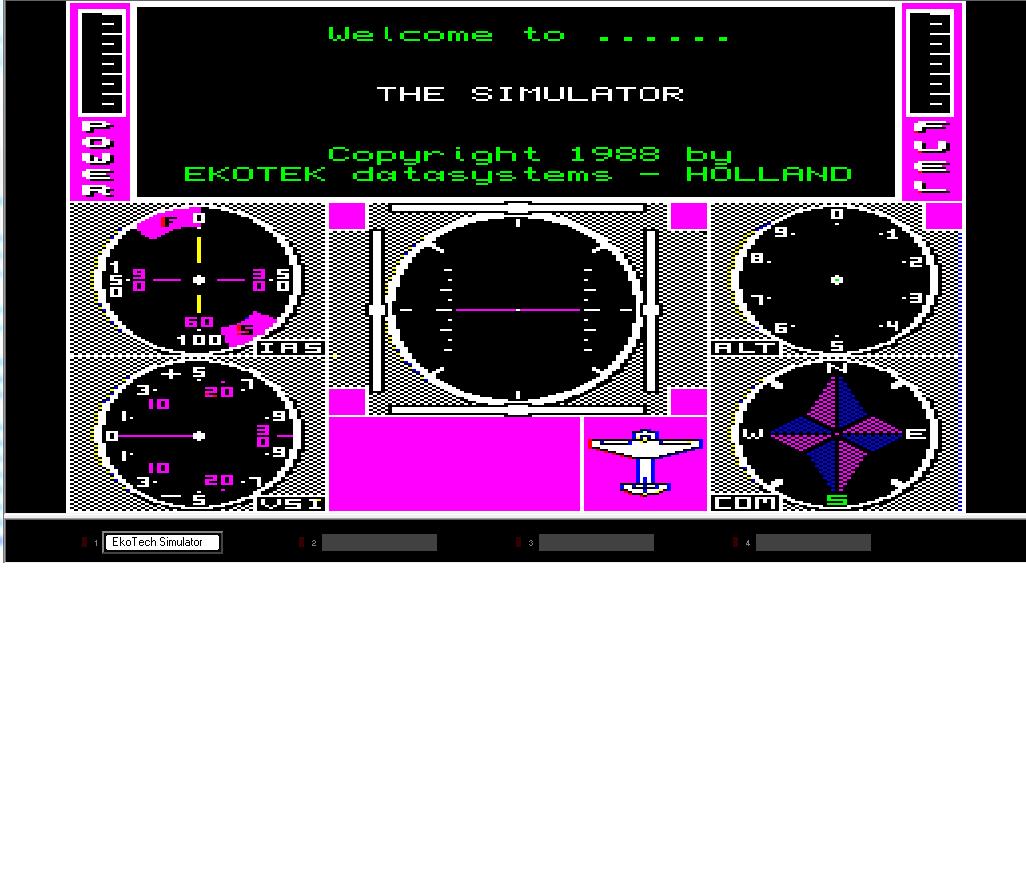
We have received permission from Robert Stekelenburg (who owned Ekotek) to make The Simulator, a flight simulator program for the QL, freeware.

We have preserved a copy which runs as a disk image in q-emulator – there is currently copy protection on this, which reduces how many copies can be made onto real disks, but at least it does allow stand-alone disk copies to be made. Robert is going to see if he still has sources so we can see if we can try to get the copy protection removed, but at least it’s available and usable now.

Detleft Obermann has put in a lot of work to make this program usable, with assistance from Tobias Fröschle. For example, the program can now be switched between MODE 8 and MODE 4.

Ian Burkinshaw has reproduced a manual and the maps and crib sheets as PDF files, available to download as PDF files alongside the program itself from the Games page on my website at http://www.dilwyn.me.uk/games/index.html

Screen dump from The Simulator for Sinclair QL

Screen dump from The Simulator for Sinclair QL

QL Forum – Live Chat

The new Live Online Chat has proven fairly popular so far, with members online most nights now, although only a relatively small number of the 223 QL Forum members use the facility at any one time. It tends to be a mix of the QL news of the moment, general chat, helping each other out with problems, discussing what we’re all up to at the time and so on, quite interesting getting to chat to other QL users in real time occasionally. For example, Dave Park of Sandy Electronics is on there several nights a week – this would be a good chance to chat to him and ask him about the exciting QL products he plans for release this year, including those already available such as the Gold Card replacement batteries, Minerva, microdrive felt pads and Mplane.

It was while on there one evening that I found out about his plans for the low cost SuperRAM, an 896K RAM card, designed for users with QL-SD (which works better with expanded RAM, although it can work on a 128K system) and older disk interfaces with no RAM expansion.

To join in the Online Chat, we are on most evenings at around 9pm UK time. You have to be a QL Forum member (signing up is free of course).

Once signed into the Forum, you will see a link above, called ‘Online Chat’ (This sits next to the ‘User Control Panel’)

You can also connect via an IRC (Internet Relay Chat) client of your choice, using the following settings;

IRC Server: chat.qlforum.co.uk
Port: 6667
Channel Name: #qlforum

QL-SD Page

Now that QL-SD is available via SellMyRetro.com, albeit in small numbers so far, I’ve set up a page where you can download the manual, software starter pack and the BDI (Block Device Image) specification for emulators, thanks to Peter Graf for supplying the software and documents. I hope that as QL-SD becomes more widely available and used, this page can act as a source and repository for documents and files relating to the QL-SD

The page is at http://www.dilwyn.me.uk/qlsd/index.html

Also, thanks to Graeme Gregory, a version of qltools has been developed specifically for use with the HxC floppy disk emulator. This is available from http://www.dilwyn.me.uk/files/index.html

And while on the subject of QL-SD, most people choose to install one QL-SD, usually in the MDV2_ slot, leaving MDV1 free to work as a microdrive. For those who would like two QL-SD per QL (e.g. backup?), Paul Veltjens who builds these devices has confirmed it’s possible to install a second SDHC adaptor as device name SDC2_. Paul says he then needs to set a jumper differently and a cable with three connectors, one for your QLROMEXT and two for the two sd card interfaces.

Pictures below from Peter Scott:

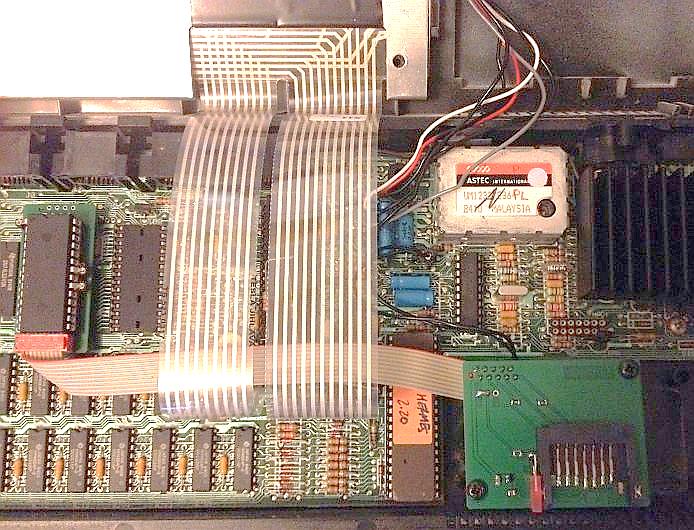
Picture of a QL-SD installed in a QL

A QL-SD installed in the MDV1_ slot on a QL, above. The two circuit boards are the ones on the left of the picture connected to the one at the bottom right of the picture via the ribbon cable. The picture below shows the finished product – all you see is the SDHC card protruding from the MDV1_ slot of Peter’s albino QL.

Picture of a QL-SD in the MDV1_ slot of a QL

Picture of a QL-SD installed in the MDV1_ slot of Peter Scott’s ‘albino’ QL

No price set for this yet, so if you require such a setup, please ask Paul via QL Forum.