Category Archives: News

Turbo Compiler and Toolkit Updated

George Gwilt writes:

New versions of some programs are now available on my website http://gwiltprogs.info

1. TURBO v5.0 allows access to its Channel Table. This table consists of a set of 32 40-byte entries one for each of the possible channels in a program compiled by TURBO. The first long word contains the ID of the QDOS channel, or -1 if none is open. The rest of the entry contains information about graphics for CON or SCR channels.

TURBO_CH(#N) returns the absolute address of the entry for channel N. N can be either an explicit number (between 0 and 31) or a variable containing the number.

2. TURBO_TK CODE v3.43 now contains the keyword TURBO_CH which, if used in S*BASIC, returns 1.

3. NET_PEEK v3.42, already issued, displays the contents of the channel table for CON/SCR channels in programs compiled by TURBO. The latest version, v3.43, now copes with programs compiled by TURBO v5.08.
The Simulator (Ekotek)

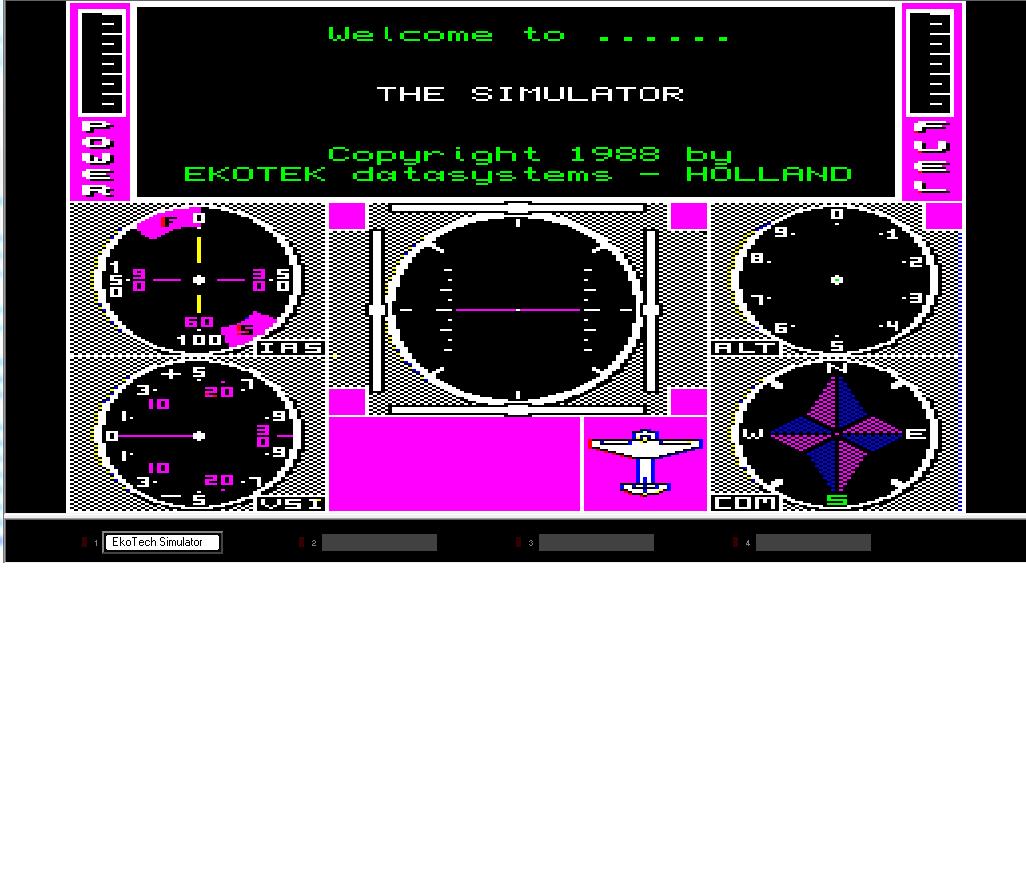
We have received permission from Robert Stekelenburg (who owned Ekotek) to make The Simulator, a flight simulator program for the QL, freeware.

We have preserved a copy which runs as a disk image in q-emulator – there is currently copy protection on this, which reduces how many copies can be made onto real disks, but at least it does allow stand-alone disk copies to be made. Robert is going to see if he still has sources so we can see if we can try to get the copy protection removed, but at least it’s available and usable now.

Detleft Obermann has put in a lot of work to make this program usable, with assistance from Tobias Fröschle. For example, the program can now be switched between MODE 8 and MODE 4.

Ian Burkinshaw has reproduced a manual and the maps and crib sheets as PDF files, available to download as PDF files alongside the program itself from the Games page on my website at http://www.dilwyn.me.uk/games/index.html

Screen dump from The Simulator for Sinclair QL

Screen dump from The Simulator for Sinclair QL

QL Forum – Live Chat

The new Live Online Chat has proven fairly popular so far, with members online most nights now, although only a relatively small number of the 223 QL Forum members use the facility at any one time. It tends to be a mix of the QL news of the moment, general chat, helping each other out with problems, discussing what we’re all up to at the time and so on, quite interesting getting to chat to other QL users in real time occasionally. For example, Dave Park of Sandy Electronics is on there several nights a week – this would be a good chance to chat to him and ask him about the exciting QL products he plans for release this year, including those already available such as the Gold Card replacement batteries, Minerva, microdrive felt pads and Mplane.

It was while on there one evening that I found out about his plans for the low cost SuperRAM, an 896K RAM card, designed for users with QL-SD (which works better with expanded RAM, although it can work on a 128K system) and older disk interfaces with no RAM expansion.

To join in the Online Chat, we are on most evenings at around 9pm UK time. You have to be a QL Forum member (signing up is free of course).

Once signed into the Forum, you will see a link above, called ‘Online Chat’ (This sits next to the ‘User Control Panel’)

You can also connect via an IRC (Internet Relay Chat) client of your choice, using the following settings;

IRC Server: chat.qlforum.co.uk
Port: 6667
Channel Name: #qlforum

QL-SD Page

Now that QL-SD is available via SellMyRetro.com, albeit in small numbers so far, I’ve set up a page where you can download the manual, software starter pack and the BDI (Block Device Image) specification for emulators, thanks to Peter Graf for supplying the software and documents. I hope that as QL-SD becomes more widely available and used, this page can act as a source and repository for documents and files relating to the QL-SD

The page is at http://www.dilwyn.me.uk/qlsd/index.html

Also, thanks to Graeme Gregory, a version of qltools has been developed specifically for use with the HxC floppy disk emulator. This is available from http://www.dilwyn.me.uk/files/index.html

And while on the subject of QL-SD, most people choose to install one QL-SD, usually in the MDV2_ slot, leaving MDV1 free to work as a microdrive. For those who would like two QL-SD per QL (e.g. backup?), Paul Veltjens who builds these devices has confirmed it’s possible to install a second SDHC adaptor as device name SDC2_. Paul says he then needs to set a jumper differently and a cable with three connectors, one for your QLROMEXT and two for the two sd card interfaces.

Pictures below from Peter Scott:

Picture of a QL-SD installed in a QL

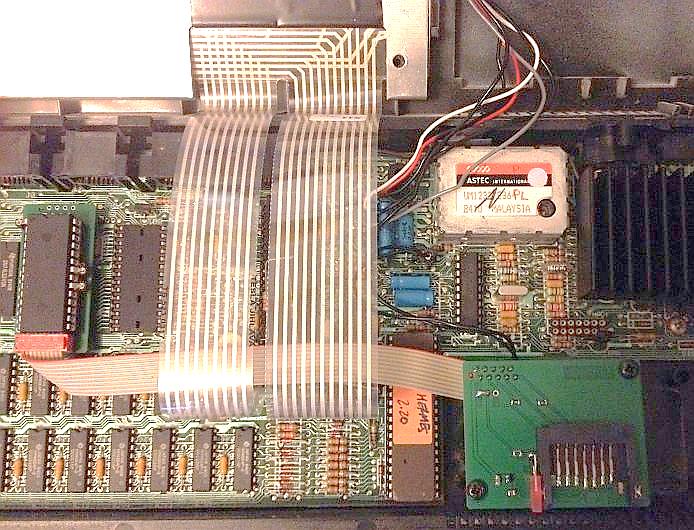
A QL-SD installed in the MDV1_ slot on a QL, above. The two circuit boards are the ones on the left of the picture connected to the one at the bottom right of the picture via the ribbon cable. The picture below shows the finished product – all you see is the SDHC card protruding from the MDV1_ slot of Peter’s albino QL.

Picture of a QL-SD in the MDV1_ slot of a QL

Picture of a QL-SD installed in the MDV1_ slot of Peter Scott’s ‘albino’ QL

No price set for this yet, so if you require such a setup, please ask Paul via QL Forum.

QL Games Cartridge

The original QL games Microdrive cartridge supplied with the QL has been available from the Games page on my website for a while now.  It includes the games Pirate, Zfred, Gun, Breakout and Hunt (Treasure Hunt).

Sadly, it turns out it was partly broken all along. If you downloaded this before 27th March 2014 you may find it does not work due to a missing file called ‘mc’ which caused the Breakout game to fail, so you should download the amended version now on the website.

The problem areas have  been rectified and/or improved by Rich Mellor, many  thanks Rich. This now needs Toolkit II to get the Zfred game to work on more  than a standard 128K RAM QL. Rich has also added a MODE 8 command at the  start of the Treasure Hunt game to improve the look of the display when it is first run and supplied the ‘mc’ file which was missing from the earlier version.

I’ve also added a scanned PDF of the original 2-page instructions letter sent out by Sinclair with the QL Games Cartridge.

Download both from the Games page on my website:

http://www.dilwyn.me.uk/games/index.html

SMSQ/E Manual

A new version of the complete SMSQ/E manual is now available. I have been fortunate to have the original Text 87 files from Jochen Merz, who kindly gave me permission to make use of them to produce and release the new version of the manuals.

What I wanted to do was to bring them up to date, as the paper copies I had were from some time ago. Even the documents I got from Jochen did not include mention of some of the more recent keywords and facilities added to SMSQ/E, for example, there was little or no mention of the Home Thing facility.

Fortunately, the SMSQ/E Registrar Wolfgang Lenerz has ensured that some documentation updates were available in the SMSQ/E source files which could be downloaded from his website at http://www.wlenerz.com/smsqe/  so between those notes and looking at the sources I was able to enhance and update the manual.

This version is an all-in-one manual. It includes the supplements for the various hardware platforms (QL, QXL, QPC, Q40/Q60 and Atari emulator, though not yet SMSQmulator). The hope is that the SMSQ/E Registrar can make this manual available via his SMSQ/E site to ensure it’s kept up to date as SMSQ/E evolves in the future.

The 108 A4 page manual (and an A5 version) is available to download in PDF, ePub, Mobi and azw3 (Kindle) eBook formats from my QL eBooks page at http://www.dilwyn.me.uk/docs/ebooks/index.html

SMSQ/E v3.20

Wolfgang Lenerz has announced that version 3.20 of SMSQ/E is now out. This is mainly a bug fix release, curing a problem which might arise when trying to write to a read-only file if a single byte is sent to a DV3 channel. It also adds (to SMSQmulator only) a Java-based timer function (see above).

Other recent changes have included the integration of QPC-specific code, a facility to have different text sizes (different CSIZEs) in application windows, window move with transparency facility and the code base now includes the Gold Card drivers for the 256 colour (Aurora-style) colour mode, which is now available in QPC2 and SMSQmulator in addition to Aurora with Super Gold Card.

The binaries of all official versions of SMSQ/E (Gold Card, Q40, QPC, QXL, Atari and SMSQmulator) can be downloaded from the SMSQ/E Registrar’s site at http://www.wlenerz.com/smsqe/

SMSQ/E website logo


The QemuLator versions of SMSQ/E are not integrated with the general SMSQ/E versions – two versions (which are a few versions behind what is available from Wolfgang’s site) are available for use with QemuLator’s Aurora and Q60 compatible ‘display card’ modes only from Daniele Terdina’s website at http://www.terdina.net/ql/software.html

SMSQmulator v1.27

Wolfgang Lenerz has announced that version 1.27 of the Java-based emulator is available to download free from his website at http://www.wlenerz.com/SMSQmulator/

It now is possible to configure it so that it doesn’t use much CPU time when the machine is idle. Changes to this only take effect after the next reset. Please read the manual section in this respect.

Other recent updates to the emulator include:

  • Also now has Aurora compatible screen mode.
  • SHIFT ESC now makes a copyright symbol.
  • MEM device for using QXL.WIN from RAM when SMSQmulator is run as an embedded applet from a website.
  • Millisecond timer using Java keywords JTMRSET and JTMRGET.
  • Sound device added in v1.23, meaning you can now use _ub (unsigned byte) sound files merely by COPYing them to the SOUND device, e.g. COPY test_ub TO SOUND. The SOUND device is largely compatible with Simon Goodwin’s SOUND driver for other systems.
Screen shot of the software supplied with SMSQmulator

The Software Supplied With SMSQmulator

SMSQmulator Update

Wolfgang Lenerz has announced that version 1.27 of the Java-based emulator is available to download free from his website at http://www.wlenerz.com/SMSQmulator/

It now is possible to configure it so that it doesn’t use much CPU time when the machine is idle. Changes to this only take effect after the next reset. Please read the manual section in this respect.

Other recent updates to the emulator include:

Also now has Aurora compatible screen mode.

  • SHIFT ESC now makes a copyright symbol.
  • MEM device for using QXL.WIN from RAM when SMSQmulator is run as an embedded applet from a website.
  • Millisecond timer using Java keywords JTMRSET and JTMRGET.
  • Sound device added in v1.23, meaning you can now use _ub (unsigned byte) sound files merely by COPYing them to the SOUND device, e.g. COPY test_ub TO SOUND. The SOUND device is largely compatible with Simon Goodwin’s SOUND driver for other systems.

QPC2 v4.02

QPC2 v4.02 has just been released. I have only recently converted to Windows 7 and found that the SMSQ/E soft reset using CTRL+ALT+SHIFT+TAB didn’t work anymore as Windows now uses CTRL+ALT+TAB for one of its many task switchers (ignoring the SHIFT key). It wasn’t exactly easy, but I finally found a workaround for this.

Also, QPC_VER$ was broken on QPC2v4.

Includes SMSQ/E v3.19 with fixed appsup-window support.

Also, there is a new qpcdemo.win with updated software on it. Plus it now includes QPAC2, as every proper system should have that!