SMSQ/E Manuals

Version 1.04 of the SMSQ/E (SBASIC) manual is now available. It consists of sections on the separate installations of SMSQ/E (Aurora, QPC, Q40, Gold Card…) and has been updated to include documentation on the Recent thing, ALPHA_BLEND keywords and Aurora installations.

Download the manual or read it online from the eBooks page on my website at http://www.dilwyn.me.uk/docs/ebooks/index.html

The online version is at http://www.dilwyn.me.uk/docs/ebooks/smsqe/SMSQE_A4.htm (note that the online version is simply saved as filtered html from the original Word document so may suffer some formatting issues and of course page number references are meaningless)

SMSQ/E v3.29

SMSQ/E now stands at version 3.29 and is available to download from Wolfgang Lenerz’s SMSQ/E Registrar pages at http://www.wlenerz.com/smsqe/

Don’t forget that you can download both the sources and binaries for all official platforms from that page.

Recent changes include:

v3.27

Maximum string array size is 32766, not 32767.

v3.28

index of string_length +1 in string slicing before the TO no longer accepted i.e. you can no longer do something like a$(5 TO 4)
FSEND_EVENT function added.
SMSQmulator : JVA_VER$ etc added, better stipple handling, copy QL screen.

v3.29

dmedium_drive$ fixed.
INPUT buffer is limited to max string length (32K -2).

QPC2 v4.05

Marcel has also released version 4.05 of the QPC2 emulator, a bug fix release which includes SMSQ/E v3.28.

This release, in addition to the usual fixed resolutions for the emulator window size, features an option to use the maximum available resolution in the startup configuration window (at the top of the list of fixed resolution selections).

Marcel has also implemented IOF.LOAD and IOF.SAVE in the IP driver, along with fixing a few errors in the IP driver itself. He has also fixed setting of file dates in the DOS device, and fixed the KEYROW value of left Ctrl key in the Windows keyboard driver of QPC2.

Download QPC2 v4.05 and the latest manual revision 4.02 from Marcel’s site at https://www.kilgus.net/qpc/downloads/

DISA 3

Marcel Kilgus has secured permission from software author Jochen Hassler to release the DISA pointer driven disassembler program as freeware.

Marcel has released version 3.04, the last official version released by Jochen Hassler in 1999, and also released version 3.05, a version Marcel himself adapted for high colour systems back in 2003.

Sadly, we are lacking a manual for version 3 of DISA, so we did the next best thing by making available DISA v2 and a manual for that version kindly provided by Norman Dunbar.

Download versions 3.04 and 3.05 from Marcel’s website at https://www.kilgus.net/2017/01/25/new-qpc2-disa-and-more/

And get version 2.01 and the manual from the Assembler programs page on my website at http://www.dilwyn.me.uk/asm/index.html

USB Mouse For SuperQBoard

Marcel Kilgus, better known for his software projects with QPC and SMSQ/E, has turned hardware tinkerer with this project to allow a USB mouse to be used with a SuperQBoard interface.

Marcel found the “New MKIV Amiga/Atari USB mouse adapter” for about 16€ plus postage. Atari mice are generally the type used for the QL, too, so Marcel just went ahead and bought it.

The first tests a few days later weren’t that encouraging, nothing worked at all. So he had a look at the schematics of the SuperQBoard and found out that although electronically it’s Atari/QIMI compatible, it used a completely different pin layout.

Have a look at his article on his blog at https://www.kilgus.net/2017/01/30/of-mice-and-men-but-mostly-mice/ for details of how he rewired the mouse to work with this interface.

WiQget 1.1

WiQget 1.1 is now available on Quantum Technology site. Here you can read an article explaining all of this new version:

http://www.hunggartorino.it/ql/wiqget-1-1-lets-find-out-together/

First and foremost comes transparency level handling: now WiQgets will have a more “discreet” look, especially at low resolutions. Opacity level can be selected for each WiQget, ranging from complete transparency to total opacity in 256 different levels. This way you can have opacity levels selected for every WiQget.

If not specified, transparency level for any WiQget is set at 50%.

The new release also has two new modules. The first is a new version of the existing digital clock, now showing seconds. The second is a memory usage module.

You can download the software from the following link

http://www.hunggartorino.it/ql/wiqget-2/

Ulrich Rosowski Hardware

High resolution pictures of the circuit boards of hardware designed by Ulrich Rosowski have been made available. No documentation, other than what can be seen etched onto the PCBs. Includes hardware such as the U+5 expansion backplane, Mega-RAM, HD-V2 (hard disk bus interface), Internal ROM expansion card, keyboard interface. Includes some photos of QIMI PCBs too.

Download the images as a PDF document from http://www.dilwyn.me.uk/docs/hardware/ql-platinen.pdf

IPNet Update

Martin Head has released v1.09 of his IP Net networking software.

New in this version:

While the original FSERVE allowed all remote network stations full access to the devices and files on the server. NASERVE blocks all remote stations from accessing the servers devices and files, until they are explicitly shared on a station by station basis, or globally to all stations.

In addition shared directories and files my be given a ‘read only’ status to prevent remote network stations changing, or deleting files on the server.

Download it from http://www.dilwyn.me.uk/internet/index.html

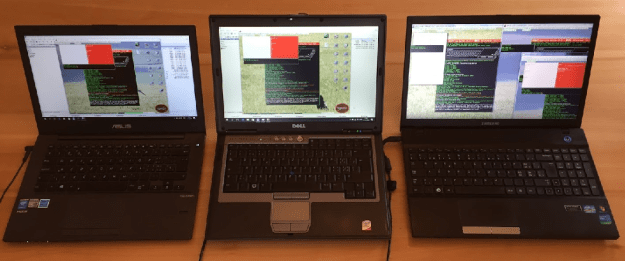
A photograph from Urs König’s blog, showing 3 laptops in action with IPNet, Martin Head’s latest IPnet in action on three PCs, two running QPC2 as IPNet nodes, one running a QPC as Router plus another QPC2 and a SMSQmulator as LocalNet notes. All setups are running QL/E

CD Explorer

A small demonstration program written in BASIC for users of QubATA to explore the content of an ISO9660 CD and copy selected files to a QDOS destination device such as RAM1_. The program is based on something supplied with QCDEZE, modified to show how direct raw sector access works with the QubATA driver. It should work on both QDOS and SMSQ/E systems with the QubATA driver installed. Requires Toolkit 2, Menu_Rext and obviously a CD-ROM drive connected to QubIDE. You have to set suitable parameters (CD device number and destination for copy) at the beginning before starting.

Download CD Explorer from http://www.dilwyn.me.uk/qlrom/index.html

QubATA Driver For Qubide

This is a complete new driver from Alain Haoui for QUBIDE cards fitted with the version 2 GAL chip upgrade.

QubATA can be installed in a ROM on the QUBIDE card, or LRESPRed into RAM as a _rext file. Both versions are included in the distribution.

This is v3.06, and includes a new manual as a PDF file.

Screen shot of QubATA driver starting up

Several new and enhanced commands are inluded.
Fast device detection, up to 16×2 devices (with Expander), full compliance with ATA/ATAPI-4 protocol and removable media support, full Trashcan and associated utilities, enhanced direct raw access and “alien” devices support.
There is also CD Data support and Audio playing set of commands (largely compatible with those in QPC2 – audio is played via the CD drive panel), optimised and working slave blocks buffering with various sizes (up to 64 sectors per block) without side effects.
Includes a simple CD player program written in BASIC, along the lines of that supplied with QPC2.
Full unsigned arithmetic allowing big partitions/files up to 2GBytes, the largest for the QDOS FS with this driver.

Screen dump showing a 2GB win3_ !

IMPORTANT: QubATA only works on QUBIDE cards with v2 GAL chips. Also, not yet fully tested on the newer integrated QUBIDEs.
Download it from the QL ROMs page http://www.dilwyn.me.uk/qlrom/index.html#Qubide on my website (note: 946KB download)

Original QUBIDE, with the Q-Branch version 2 GAL chips and v2.01 EPROM

The first question is likely to be “How can I ensure my QUBIDE is compatible with this?”
Firstly, check the version number of your existing QUBIDE software – it’s displayed as the QUBIDE drivers start up. If this is V2.00 or later, it’s likely that your QUBIDE will be compatible since the v2.xx software needs the upgraded GAL chips.
If the QUBIDE has v1.xx software it’s likely it might not work with QubATA software since that relies on the presence of the upgraded GAL chips. On an original version 1 QUBIDE, these were simply labelled GAL1 and GAL2 (see the photo), on a version 2 QUBIDE, they may be labelled GAL1A and GAL1B.
For newer QUBIDEs such as those from José Leandro, or Zaxon in Poland (available through SellMyRetro.com), or the Russian Trump Card clone with integrated QUBIDE, you would be better advised ot contact the supplier to ask what version they supply. Alan Haoui has been able to get QubATA working with a prototype of the Russian Trump Card with QUBIDE, but it may still be worth checking with the supplier.
One way of testing is to start the QUBIDE with its on-board software, then once you have booted up, try to LRESPR the QubATA software:
LRESPR dddn_QATA306b_rext
dddn_ might be flp1_ or win1_ (wherever you saved this file). The filename may vary depending on which version you use. Always try this with the version with filename ending with _rext. The version with filename ending in _rom is designed to be burned into an EPROM and plugged into the EPROM socket on the QUBIDE. The _rom version won’t work if you LRESPR it.
Alain says that this will do no harm on QUBIDEs which have older software. You need to watch the message as the software starts up. It unlinks the original QUBIDE software (don’t worry, the link is restored next time you swithc on the QL/QUBIDE) and if it fails to work with your system there will simply be an error message.
We are seeking to locate the code necessary to produce further runs of the QUBIDE upgrade chipset, plus of course permission from the original developers Nasta and Phil Borman to make these available.